Pool League Lineup Calculator
for APA, TAP & Skill-Cap Leagues
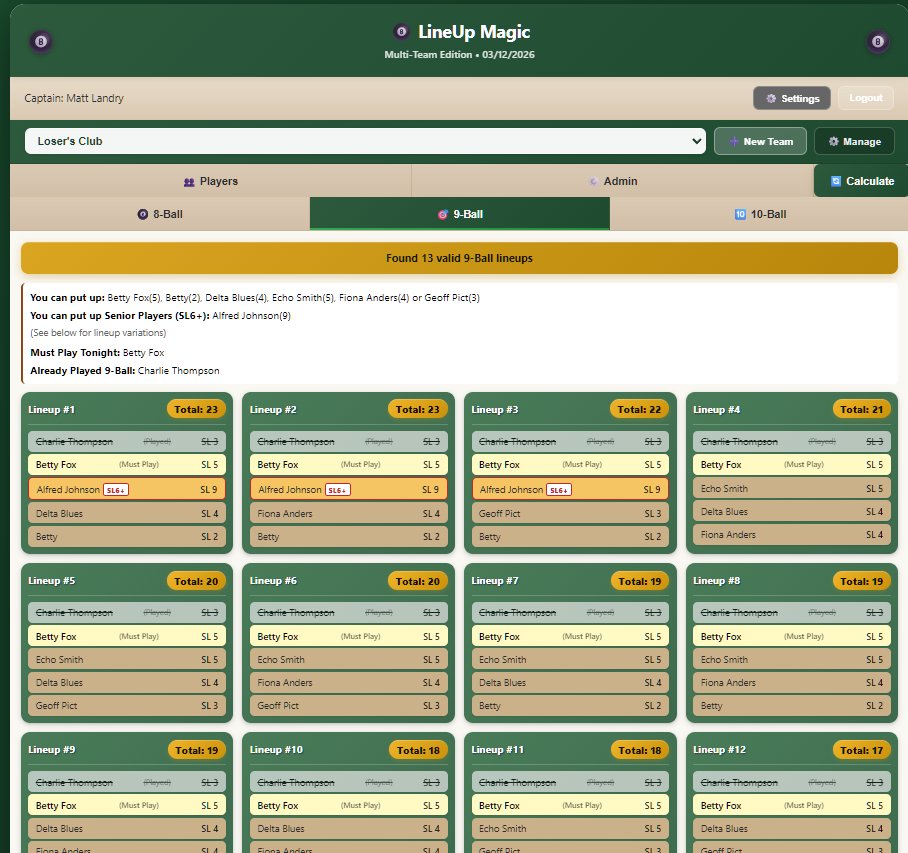
LineUp Magic is built for pool league team captains who want a running summary of accurate put-up options available at a glance all through match night. Whether you play APA, TAP, or any skill-cap league, it instantly generates every valid lineup combination for 8-Ball, 9-Ball, and 10-Ball at or under your team's skill level cap.
If you manage multiple teams, or teams across different leagues, all your rosters are in one place and ready to go.
Built specifically for the APA 23 rule and TAP 25 rule, it eliminates lineup math so you never risk a forfeit.
âļ Try It Free - No Account Needed
Jump in with a sample team or swap in your own players. If you decide to create a free account later, your roster transfers automatically; nothing to re-enter.
đą
LineUp Magic
The Pool Team Captain's Calculator
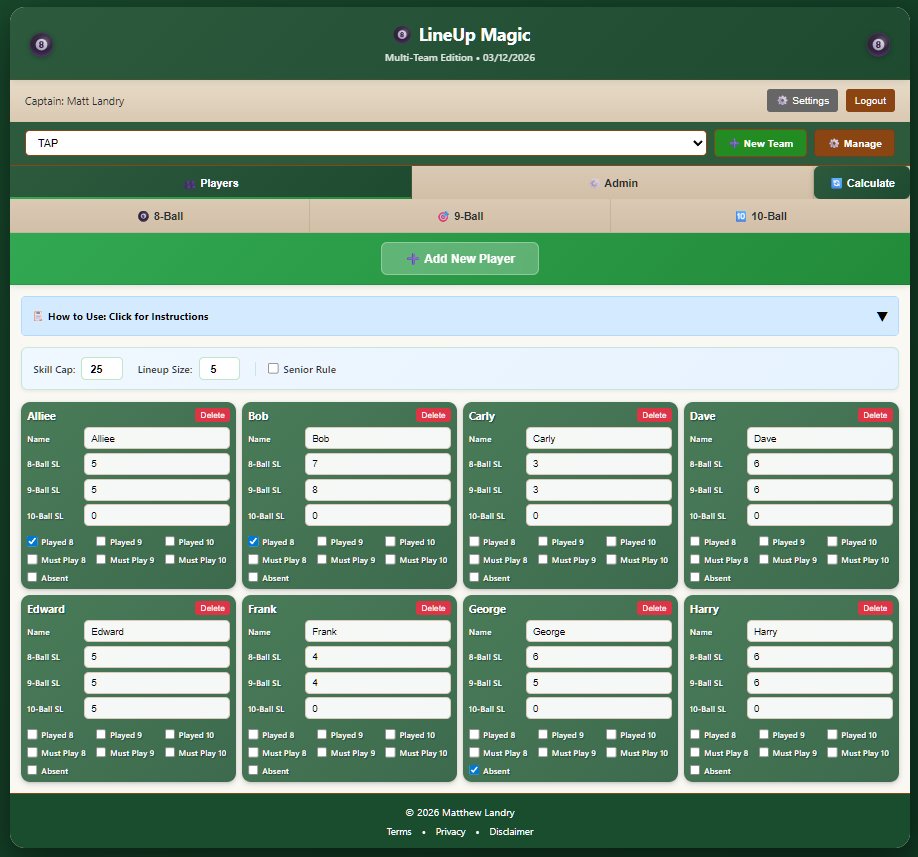
On league night all you need to do is scroll through the stack of player cards (all on a single easy to read page) and quickly check boxes to mark players absent, flag must-plays, and check off your players as they start a match. LineUp Magic handles everything else and gives you a running list of the players you can use, plus a summary of who's played already and a reminder if you have a player who 'must' play a match in any format.
It'll also warn you if you are putting up too many senior players.
The app refreshes every time you put someone up, and shows an automatically updated summary of your remaining options.
LineUp Magic was built by Matt Landry. I'm an APA and TAP pool player in upstate New York. I love pool, and when I'm not playing or working I'm watching pool videos or something related. I'm a 5/5 in APA and a 4/3 in TAP. I play with a Cuetec AVID Chroma Mojave and sometimes a Schmelke.
The app is easy to use and it's my sincere hope that it'll help you have more fun playing and experience less stress on league nights!
Gear I Use
đ How to Use: Click to toggle instructions
âŧ
LineupMagic.com calculates every valid lineup using your customizable settings. Adjust the skill level cap (default 23 for APA, 25 for TAP) and players per lineup (default 5) to match your league format. All valid combinations are sorted by strongest (closest to your cap) lineups first.
âĸ Using the Add New Player button, create a spot for each member of your team and enter their skill levels in 8-ball, 9-ball, and 10-ball. (Enter 0 if they don't play a format)
Your roster names and their skill levels only need to be entered once and are updated only when player skill levels change.
âĸ Mark any players absent who will not be playing. Absent players are not included in lineup calculations.
âĸ Mark "Must Play 8", "Must Play 9", or "Must Play 10" if a player is required to play that format. They will be included in every lineup calculation for that format.
âĸ Mark "Played 8", "Played 9", or "Played 10" once a player starts their match. The calc will then show all possible lineups using your remaining available players.
âĸ If a player only plays one format, don't mark them absent. Just enter skill level zero for the formats they don't play. They'll only appear in calculations for the format where they have a skill level entered.
Settings bar: (adjustable rules)
âĸ Skill Cap: sets the maximum combined skill level for a lineup (23 for APA, 25 for TAP, adjust for your league).
âĸ Lineup Size: number of players per lineup (default 5; use 3 for 3-person format, etc.).
âĸ Senior Rule: optional check for leagues that limit how many high-rated players can be fielded in a match (e.g. APA limits teams to 2 players at SL6 or higher). Off by default. When enabled, lineups exceeding your limit are flagged with a warning but still shown so you can see all options.